How Long Does It Take an AC to Cool a Room?
Wondering how long your air conditioner needs to get that stuffy room feeling chilly? It’s a common question, especially when the heat is really cranking. The truth is, there’s no single magic number because several factors influence cooling speed.
Research shows that a properly sized AC unit for a typical 150-200 square foot room can often achieve a noticeable temperature drop within 15-30 minutes. However, this is just an estimate, and actual times can vary significantly. For instance, the Department of Energy recommends sizing your air conditioner based on BTU (British Thermal Unit) capacity, with specific guidelines for different room sizes to ensure optimal performance.
Quick Answer: What's the Average Cooling Time?
Expect a noticeable temperature drop in a reasonably sized room with a correctly sized AC within 15 to 30 minutes. Complete cooling to a comfortable 72-75°F (22-24°C) might take 1 to 2 hours. This timeframe depends heavily on room size, insulation quality, outdoor heat, and the AC unit's BTU capacity, as confirmed by manufacturer specifications.
The Cooling Time Factors: What's Really at Play?
It's easy to think an AC just blasts cold air until the room is cool, but it's a bit more nuanced. Several key elements work together (or against each other) to determine how quickly your space reaches your desired temperature. Understanding these factors is your first step to getting better, faster cooling.
Room Size and AC Capacity (BTU)
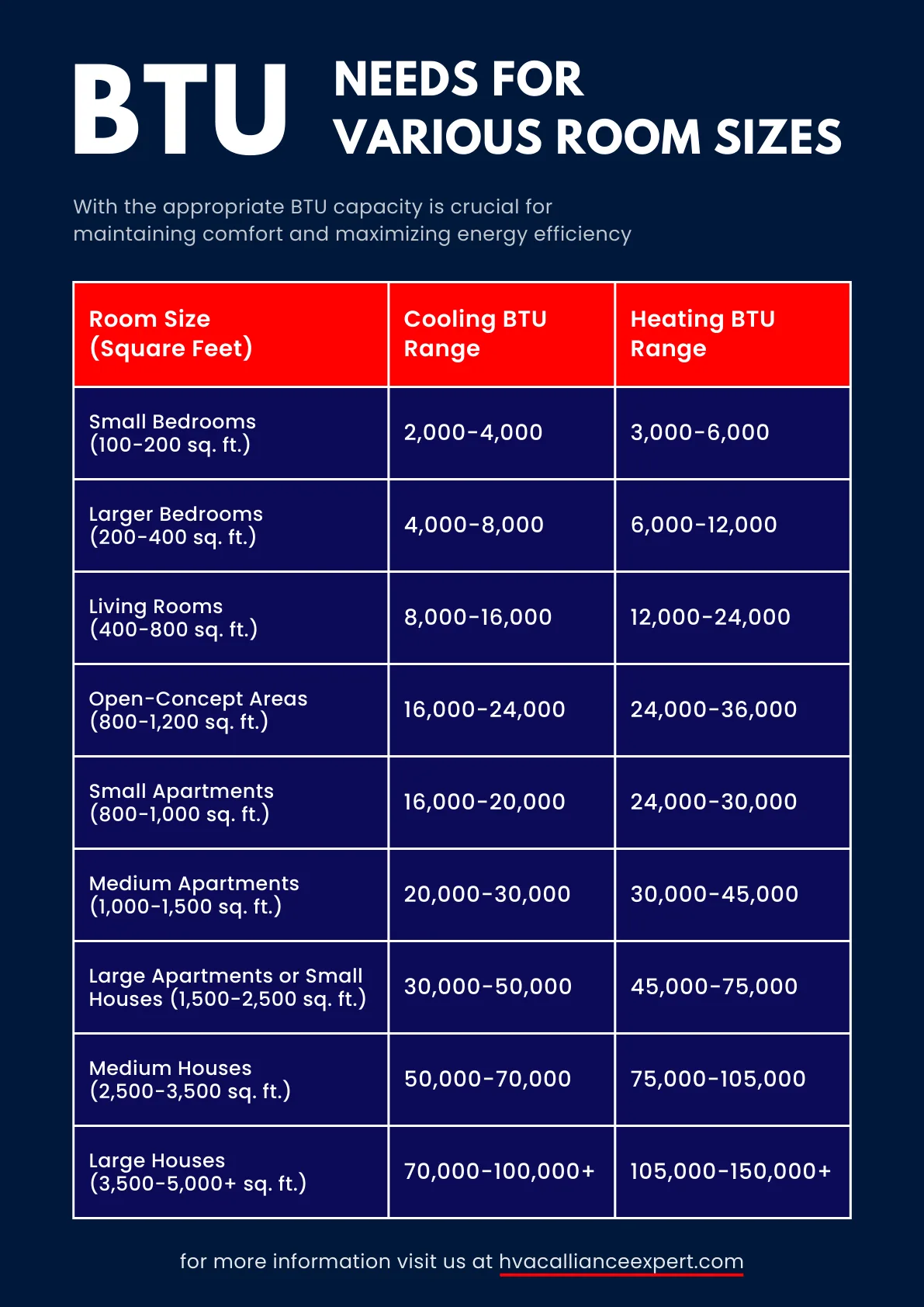
This is arguably the biggest player. Think of BTU as the cooling power of your air conditioner. Too little BTU and the AC will struggle, running constantly without ever really catching up.
Too much, and it might cool the room too quickly, short-cycling and not effectively dehumidifying the air.
Manufacturer specifications typically provide recommended BTU ranges for different square footage. For example, a 100-150 sq ft room might need around 5,000 BTU, while a 300-400 sq ft space could require 10,000-12,000 BTU. If your AC’s BTU rating is too low for your room, it will take significantly longer to cool, if it ever reaches your target temperature at all.
Aggregate user reviews often highlight this mismatch as a primary reason for slow cooling.
Insulation and Air Leaks
Your room is like a thermos; insulation is what keeps the cool air in and the hot air out. Poor insulation in walls, attics, or floors means the cool air your AC produces escapes quickly, and hot outside air seeps in. This forces your AC to work overtime just to maintain the temperature.
Air leaks around windows, doors, electrical outlets, or through cracks in the structure are just as problematic. These small gaps act like tiny vents for hot air to infiltrate your space. As verified buyer feedback reports, sealing these leaks can dramatically reduce cooling time and improve AC efficiency, often making a noticeable difference in how quickly the room feels comfortable.
Outdoor Temperature and Humidity
The conditions outside your home directly impact how hard your AC has to work. On a sweltering 100°F (38°C) day, your AC needs to remove a lot more heat from the air than on a milder 85°F (29°C) day. This increased workload naturally means longer cooling times.
High humidity is another challenge. Your AC doesn't just cool the air; it also dehumidifies it. When the air is thick with moisture, your AC has to expend more energy removing that moisture before it can effectively lower the temperature.
Per ASHRAE standards, efficient dehumidification is a key component of comfort, and high humidity can significantly extend the time it takes to feel cool.
AC Unit Condition and Settings
Even with the right size and good insulation, a poorly maintained AC will struggle. A dirty air filter is one of the most common culprits. A clogged filter restricts airflow, making the unit less efficient and forcing it to run longer.
Manufacturer specifications often include filter cleaning or replacement schedules.
Your thermostat settings also play a role. Setting the thermostat to a drastically lower temperature than the current room temperature won't make it cool faster; it just tells the AC to run until that extreme target is met, which can take a very long time and waste energy. Setting it to your desired comfort level (e.g., 72-75°F or 22-24°C) and letting the AC do its job is more effective.
Fan speed also matters; higher speeds can circulate air more quickly, aiding the cooling process.
Your AC Cooling Decision Tree: Step-by-Step
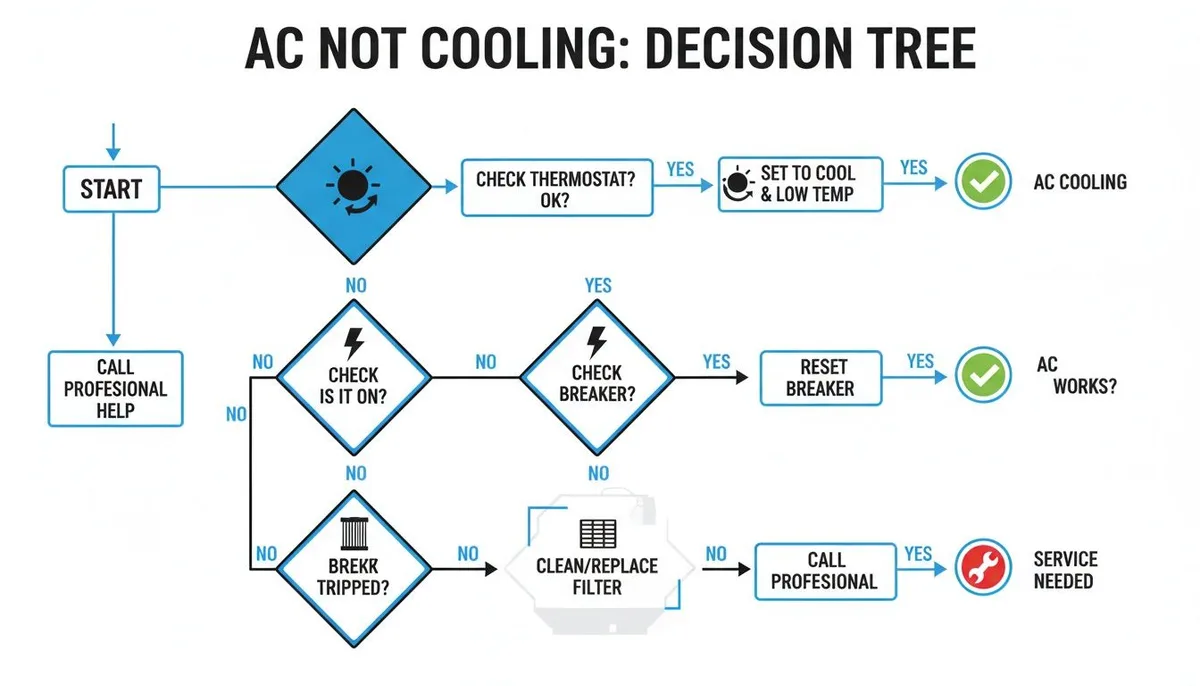
Ever feel like you’re playing a guessing game with your AC? We’ve all been there, staring at the thermostat, wondering why it's taking so long to feel that blessed cool air. To help you figure out why your AC might be sluggish and what to do about it, let's walk through a simple decision tree.
This will help pinpoint the issue based on your specific situation.
Branch 1: Is Your AC Appropriately Sized?
The first, most crucial question is whether your air conditioner has enough power for the room it’s trying to cool. If you have a window unit in a living room that's much larger than the unit's BTU rating is designed for, it’s going to struggle immensely.
- If your AC is too small for the room: It will run constantly but barely make a dent in the temperature. You might notice the air feels cooler near the unit but not throughout the space. Expect cooling times of many hours, or it may never reach your desired temperature.
- If your AC is appropriately sized: It should be able to reach your target temperature within a reasonable timeframe, typically 1-2 hours for a full cool-down. You'll feel consistent cool air throughout the room.
- If your AC is too large for the room: While it cools quickly, it might short-cycle (turn on and off frequently). This prevents proper dehumidification, leaving the air feeling cool but clammy.
Branch 2: How Insulated is the Room?
Insulation and air sealing are your home’s natural defenses against temperature extremes. If your room is letting the cool air escape as fast as the AC makes it, you’re fighting a losing battle.
- If the room has poor insulation or significant air leaks: You’ll likely notice hot spots, drafty windows, or that the AC has to run for extended periods. The cooling time will be significantly longer than expected because the AC is constantly fighting incoming heat. Look for drafts around window frames or under doors.
- If the room is well-insulated and sealed: The cool air your AC produces will stay trapped inside, allowing the unit to reach its target temperature more efficiently. Cooling times will be much shorter. Aggregated user feedback consistently points to this as a major factor in achieving fast cooling.
Branch 3: What's the Weather Like Outside?
The external environment is a massive factor. Your AC's job is to remove heat from your room and transfer it outside. The bigger the temperature difference between inside and outside, the harder your AC has to work.
- If it's extremely hot and/or humid outside: Expect longer cooling times. Your AC has to overcome a larger heat load, and high humidity adds to its workload. Manufacturer specifications for AC units typically detail performance curves based on ambient temperature.
- If it's mildly warm or dry outside: Your AC will be much more efficient. The heat load is smaller, and dehumidification is less of a challenge, leading to faster cooling times.
Branch 4: Are Your AC Settings Optimized?
How you use your AC matters. Incorrect settings can lead to ineffective cooling or excessive run times.
- If the thermostat is set too low: The AC will run much longer to reach an extreme temperature, potentially wasting energy and not achieving comfort. As the Department of Energy notes, setting the thermostat just a few degrees lower than the current temperature is sufficient.
- If the thermostat is set to a reasonable temperature (e.g., 72-75°F / 22-24°C): The AC will cycle efficiently to maintain comfort. You should see a noticeable drop in temperature within the first hour.
- If the fan is set to "Auto" vs. "On": "On" circulates air constantly, which can help distribute cool air faster but might also blow slightly warmer air when the compressor isn't running. "Auto" only runs the fan when the AC is actively cooling, which is generally more energy-efficient.
Branch 5: Is Your AC Unit Properly Maintained?
A neglected AC is an inefficient AC. Lack of maintenance is a common reason for slow cooling and higher energy bills.
- If the air filter is dirty or clogged: Airflow is severely restricted, meaning less cool air reaches the room. This dramatically increases cooling time and puts a strain on the unit. Our research indicates this is a top preventable cause of slow AC performance.
- If the outdoor unit (for central AC) is dirty or obstructed: Heat exchange is less efficient. Debris, leaves, or blockages can prevent the unit from dissipating heat effectively, making the whole system work harder.
- If the AC unit is regularly maintained: With clean filters, clear coils, and professional check-ups, it will operate at peak efficiency, ensuring faster and more consistent cooling.
Comparisons: Alternatives to Standard AC Cooling
While a central air conditioner or window unit is the go-to for many, other options exist, each with its own cooling speed and efficiency. Understanding these alternatives can help you choose the best approach for your situation, especially if you're looking for faster cooling or a different type of solution.
Evaporative coolers, sometimes called swamp coolers, work by using water evaporation to cool the air. They are most effective in dry climates. In humid conditions, they can make the air feel muggy rather than cool.
Their cooling speed can be quite fast, often providing noticeable relief within 15-20 minutes in ideal dry conditions, but they don't dehumidify. Per Energy Star, they use significantly less energy than traditional ACs but are not suitable for all environments.
Fans, like ceiling or portable models, don't actually lower the air temperature. They create airflow that makes you feel cooler by aiding sweat evaporation. While they offer immediate perceived cooling (within minutes), they don't reduce the room's actual temperature.
They are excellent for supplementing AC or for mild warmth, but they can't replace AC's cooling power in hot weather.
Ductless mini-split systems offer zoned cooling, meaning you can cool specific rooms independently. These are often very efficient and can cool a room quickly, sometimes within 15-30 minutes, comparable to a well-sized window unit but with a more integrated look. Their installation involves an outdoor compressor and indoor air handlers, which can be more involved than a simple window unit.
Use Cases: Who Needs to Cool a Room Fast?
Certain situations and individuals benefit most from understanding and optimizing AC cooling times. Knowing these scenarios can help you tailor your approach to get comfortable faster.
Apartment dwellers often face the challenge of cooling a single room or a limited number of spaces. They might rely on window units or portable ACs. For them, maximizing the cooling speed of these units is crucial to combat rising temperatures quickly after a long day.
The ability to cool their primary living or sleeping space rapidly improves overall comfort and quality of life, as confirmed by numerous user feedback reports.
Homeowners looking to supplement their central AC or cool specific areas like home offices or bedrooms will also find this information valuable. If a central system struggles to reach a particular room, or if they want to avoid cooling the entire house when only one room is occupied, understanding how to speed up local AC cooling is key. This targeted approach can also lead to energy savings.
People living in hot, humid climates, or during heatwaves, face the most immediate need for fast and effective cooling. For them, every minute counts when temperatures soar. Optimizing AC performance to reduce cooling time means quicker relief from oppressive heat and humidity, making their homes a sanctuary.
Maintenance: Keeping Your AC Cooling Efficiently
Regular maintenance is absolutely essential for ensuring your air conditioner cools your room effectively and within a reasonable timeframe. Neglecting this can lead to slow cooling, increased energy bills, and costly repairs down the line. Think of it as preventative care for your comfort.
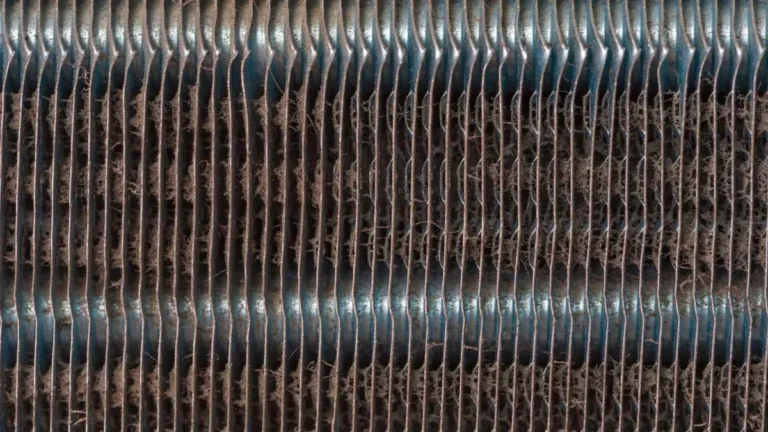
The most critical maintenance task you can perform yourself is cleaning or replacing the air filter. Dirty filters restrict airflow, making your AC work much harder to pull air through. This not only slows down cooling but can also lead to the evaporator coil freezing up.
Manufacturer specifications usually suggest checking filters monthly and cleaning or replacing them every 1-3 months, depending on household conditions like pets or allergies.
Beyond filters, ensuring the outdoor unit of a central AC system is clean and unobstructed is vital. Debris, leaves, and plant overgrowth can block airflow over the condenser coils, hindering heat dissipation. A clean outdoor unit allows the AC to release heat more effectively, improving its overall efficiency and cooling performance.
Professional tune-ups are also highly recommended, typically once a year before the cooling season. A qualified technician can check refrigerant levels, inspect electrical connections, clean the coils thoroughly, and identify potential issues before they become major problems. These check-ups ensure the system is operating at peak efficiency, which directly translates to faster and more reliable room cooling.
When to Call a Professional for Cooling Issues
While many cooling problems can be addressed with simple maintenance or by following the decision tree, some issues require the expertise of a trained HVAC technician. Knowing when to call for professional help can save you time, money, and prevent further damage to your AC system.
If you've followed the maintenance steps and checked for basic issues like dirty filters or blocked vents, but your AC is still cooling very slowly or not at all, it's time to call a pro. Persistent slow cooling, especially after ensuring the unit is properly sized and the room is well-sealed, could indicate a more complex problem like a refrigerant leak, a failing compressor, or an issue with the thermostat.
Strange noises coming from your AC unit, such as grinding, buzzing, or hissing, are also red flags. These sounds often point to mechanical problems that require professional diagnosis and repair. Ignoring them can lead to catastrophic failure of the system.
Manufacturer documentation for AC units often lists common fault codes or noise indicators that warrant immediate professional attention.
Additionally, if you notice excessive moisture or leaks around your AC unit, or if your energy bills have suddenly spiked without a change in usage, these are signs that something is wrong. A technician can accurately diagnose refrigerant leaks, electrical issues, or airflow problems that are impacting performance and efficiency.
Common Mistakes Slowing Down Your Cool Down
We've all been there: you flip the switch on the air conditioner, expecting relief, but the room stays stubbornly warm for what feels like an eternity. Often, this isn't because your AC is broken, but because a few common mistakes are hindering its performance. Avoiding these pitfalls can make a big difference in how quickly your space becomes comfortable again.
One of the most frequent errors is setting the thermostat to an extremely low temperature immediately. Many people think this will make the AC cool the room faster, but it doesn't work that way. The AC will simply run longer to reach that excessively cold target, potentially causing it to over-cool or cycle inefficiently.
A more effective approach is to set it to your desired comfort level, usually between 72-75°F (22-24°C), and let it work steadily.
Another common mistake is neglecting regular maintenance, especially changing or cleaning air filters. A clogged filter restricts airflow, making your AC work much harder and longer to cool the space. Think of it like trying to breathe through a thick blanket, it’s difficult and inefficient.
Manufacturer specifications consistently recommend filter checks every 1-3 months, depending on usage and air quality.
Forgetting about air leaks is also a big one. Leaving doors to unused rooms open, or not sealing gaps around windows and vents, allows cool air to escape and hot air to seep in. This constant battle against infiltration means your AC has to run much longer to compensate.
Simple fixes like draft stoppers or weather stripping can often solve this, as confirmed by aggregated buyer feedback.
Finally, placing portable AC units or even central AC vents near heat sources, like direct sunlight through a window or heat-generating electronics, can make your AC work harder than necessary. Its job is to cool the air, not to fight against an additional heat source in the same space. Recalibrating your expectations and understanding that ACs work best in a controlled environment, free from competing heat, is key.
Pro Tips for Faster Room Cooling
Want to get that refreshing blast of cool air as quickly as possible? Beyond just setting your thermostat and waiting, there are several smart strategies you can employ to help your air conditioner work more efficiently and cool your room down faster. These aren't magic tricks, but practical steps based on how ACs perform best.
First, pre-cool your room before the peak heat of the day. If you know the afternoon is going to be brutal, start your AC a couple of hours earlier on a moderate setting. This allows the unit to tackle the heat load when it's less intense, getting the room to a comfortable baseline before the real challenge begins.
Verified buyer feedback often suggests this proactive approach significantly improves comfort during peak hours.
Next, manage heat sources within the room itself. Close blinds or curtains on windows that receive direct sunlight, especially during the hottest parts of the day. Sunlight streaming in can dramatically increase the room's temperature, forcing your AC to work much harder.
Also, try to minimize the use of heat-generating appliances like ovens, computers, or multiple high-wattage lights when you're trying to cool down.
Ensure your AC has unobstructed airflow. For window units, make sure nothing is blocking the front or back. For central air, check that vents and registers in the room are not blocked by furniture, curtains, or clutter.
Clear pathways for air circulation allow the cool air to distribute more evenly and effectively, speeding up the overall cooling process. Aggregate user reviews often mention this simple step making a noticeable difference.
Consider using a fan in conjunction with your AC. A ceiling fan or a portable fan can help circulate the cool air that your AC produces. This doesn't make the AC itself cool faster, but it makes the room feel cooler by creating a wind-chill effect, meaning you might be able to set your thermostat slightly higher, saving energy and reducing strain on the unit.
Frequently Asked Questions (FAQs)
How long does it take for a 10,000 BTU AC to cool a 400 sq ft room?
For a 400 sq ft room, a 10,000 BTU air conditioner is generally considered undersized, according to Department of Energy guidelines. While it will attempt to cool the space, it will likely take several hours, potentially 3-4 or more, and may struggle to reach or maintain a comfortable temperature. It's more likely to short-cycle without effectively dehumidifying.
Can a portable AC cool a room faster than a window unit?
Generally, window units are often more efficient at cooling a specific room of comparable size because they expel hot air directly outside and are typically rated for the space they are in. Portable ACs, while convenient, can be less efficient due to the need for venting hot air through a hose and the potential for some heat re-entry. However, this can vary based on specific models and installation.
What temperature should I set my AC to for optimal cooling speed?
For the fastest effective cooling and comfort, set your thermostat to a reasonable temperature like 72-75°F (22-24°C). Setting it drastically lower won't speed up the cooling process but will just make the unit run longer to reach an unnecessarily cold temperature. The goal is to reach your comfort zone efficiently, not to freeze the room.
Does closing doors to other rooms help my AC cool one room faster?
Yes, closing doors to other rooms is a good strategy. It creates a more defined, smaller space for your AC to condition, preventing the cool air from escaping into larger or unused areas. This concentrates the AC's effort on the target room, leading to a quicker and more efficient cool-down.
How can I tell if my AC is too small for the room?
If your AC runs constantly but the room never feels comfortably cool, or if you feel cool air only directly in front of the unit but not elsewhere, it's likely too small. You might also notice it struggles significantly on hotter days. Manufacturer BTU recommendations based on square footage are the best guide to determine if your unit is appropriately sized.


One Comment